# Comfort 220 Airport doors
**URL:** https://community.garadget.com/t/comfort-220-airport-doors/547
**Category:** Install
**Tags:** opener, wiring, comfort
**Created:** [October 18, 2016, 10:37pm UTC](https://community.garadget.com/t/comfort-220-airport-doors/547 "2016-10-18T22:37:21Z")
**Posts on this page:** 11
**Page:** 1
### Author:  [@rdinha](https://community.garadget.com/u/rdinha)
#### Post date: [October 18, 2016, 10:37pm UTC](https://community.garadget.com/t/comfort-220-airport-doors/547/1 "2016-10-18T22:37:22Z")
hi there,
I am trying to purchase garadget but want to make aure it will work with my door [https://www.manualslib.com/products/Marantec-Comfort-220-3355137.html](https://www.manualslib.com/products/Marantec-Comfort-220-3355137.html) I see few ports 1 ,2 ,3 ,70, 71 but not sure where I will need to plug in the new unit. can you please confirm it will work and where to plug in before I purchase
thanks
Rami
---
### Author:  [@sheeted](https://community.garadget.com/u/sheeted)
#### Post date: [October 18, 2016, 11:33pm UTC](https://community.garadget.com/t/comfort-220-airport-doors/547/4 "2016-10-18T23:33:29Z")
Check the Manual
> **[comfort-2xx-2-gb.pdf](https://portmester.no/wp-content/uploads/2015/11/comfort-2xx-2-gb.pdf)**
>
> 3.13 MB
Page 12
then (only guessing as I know nothing about this equipment) I would probably say the the connections are 70 and 71 as the Garadget acts as photocell. You have to take a risk on these things - I did and LOVE IT - 2 of my friends have now bought them - HIGHLY RECOMMENDED.
Sorry not much help - BUT if it does work - please post your instructions up on how you did it on the forum - and give me all the credit (LOL).
---
### Author:  [@garadget](https://community.garadget.com/u/garadget)
#### Post date: [October 19, 2016, 12:34am UTC](https://community.garadget.com/t/comfort-220-airport-doors/547/5 "2016-10-19T00:34:40Z")
@rdinha, thank your your interest in Garadget.
Sorry @sheeted, I’m going to tap into some of that sweet credit here. 😉
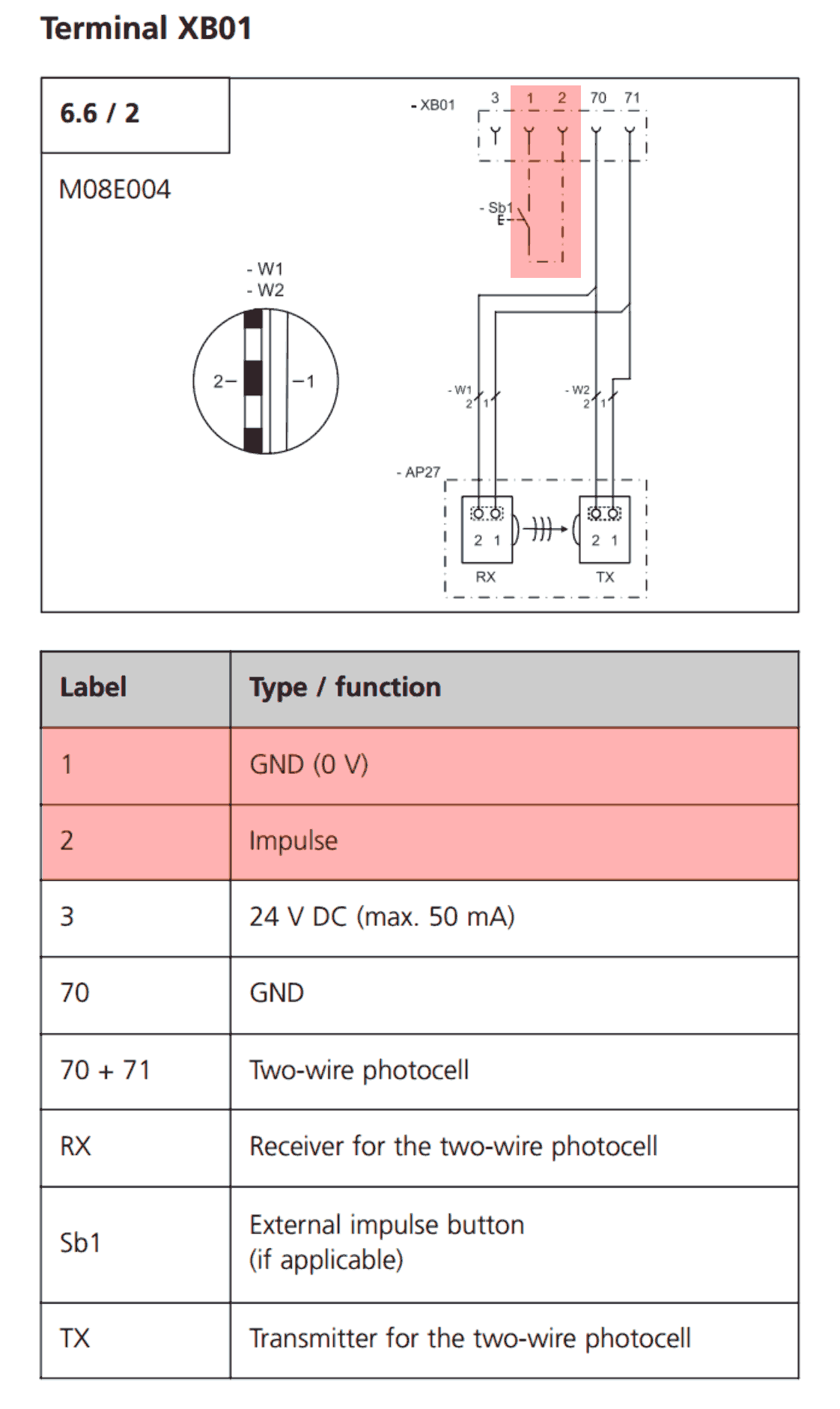
This [manual](http://www.thegaragedoorcentre.co.uk/download/Marantec%20Comfort.pdf) has an illustration on page 12 showing push button connected to terminals 1 and 2. That’s where Garadget terminals should be connected.
---
### Author:  [@rdinha](https://community.garadget.com/u/rdinha)
#### Post date: [October 19, 2016, 12:55am UTC](https://community.garadget.com/t/comfort-220-airport-doors/547/6 "2016-10-19T00:55:59Z")
thanks garadget,
sorry to sound dumb but on the garadget device what colours are the cables and which color goes in 1 and 2?
---
### Author:  [@garadget](https://community.garadget.com/u/garadget)
#### Post date: [October 19, 2016, 1:06am UTC](https://community.garadget.com/t/comfort-220-airport-doors/547/7 "2016-10-19T01:06:39Z")
There is no difference. Inside of Garadget the terminals are connected to the normally open contacts of electro-mechanical relay which acts as a regular push button as far as opener is concerned.
---
### Author:  [@rdinha](https://community.garadget.com/u/rdinha)
#### Post date: [October 19, 2016, 1:58am UTC](https://community.garadget.com/t/comfort-220-airport-doors/547/8 "2016-10-19T01:58:21Z")
So plug and play you go
---
### Author:  [@sheeted](https://community.garadget.com/u/sheeted)
#### Post date: [October 19, 2016, 2:02am UTC](https://community.garadget.com/t/comfort-220-airport-doors/547/9 "2016-10-19T02:02:05Z")
Thanks Garadget - you must take full credit
Good Community - always active
Rdinha - please post what you did so the community can grow
Cheers
---
### Author:  [@Osterlund](https://community.garadget.com/u/Osterlund)
#### Post date: [May 5, 2020, 8:43pm UTC](https://community.garadget.com/t/comfort-220-airport-doors/547/10 "2020-05-05T20:43:21Z")
Is it possible to connect the Garadget to connector 3 (the 24v output) or is the only solution to install an external power supply?
---
### Author:  [@garadget](https://community.garadget.com/u/garadget)
#### Post date: [May 5, 2020, 10:43pm UTC](https://community.garadget.com/t/comfort-220-airport-doors/547/11 "2020-05-05T22:43:50Z")
You can power Garadget from 24V source after bringing voltage down to 5V.
Check out these options:
[https://www.ebay.com/sch/i.html?\_nkw=step+down+buck+converter+USB](https://www.ebay.com/sch/i.html?_nkw=step+down+buck+converter+USB)
---
### Author:  [@Osterlund](https://community.garadget.com/u/Osterlund)
#### Post date: [May 6, 2020, 8:41am UTC](https://community.garadget.com/t/comfort-220-airport-doors/547/12 "2020-05-06T08:41:42Z")
Thank you for your reply. Another question - and forgive my lacking knowledge.
1. List item
I found a Step Down with these data - would it work if I set it to 5V, 3A (what about Watt) and connected it to port 1 (GND 0V) and port 3 (24V) on the garage door?:
**DC 5A Step Down**
**Module performance and features:**
Module properties: the isolation step-down module (BUCK)
**Input voltage: 4-38 V(please try not to exceed 38 V input)**
**Output voltage: 1.25-36 V continuous adjustable**
**Output current: 0–5 A**
**Output power: 75 W**
Working temperature: – 40 ~ 85 ℃
Working frequency: 180 KHZ
Conversion efficiency: MAX 96%
Load regulation: S (I) ≤ 0.8% ( 24 V input, 12 V output, load changes from 1 to 4.5 A measured)
Voltage regulation: S (u) ≤ 0.8% (12 V output, 4 A, voltage from 18 to 32 V change measured)
Power light: yes
Short circuit protection: yes (limit current 8 A)
Overtemperature protection: yes (After overtemperature automatic shut off output)
Input reverse connect protection: no, (if you need please in the input string into the high current diode)
Installation method: 2 pcs 3 mm screw
Connection mode: welding, V – IN for the input, V – OUT for the output Module size: 54mm_23mm_15mm(L_W_H)
---
### Author:  [@garadget](https://community.garadget.com/u/garadget)
#### Post date: [May 6, 2020, 3:02pm UTC](https://community.garadget.com/t/comfort-220-airport-doors/547/13 "2020-05-06T15:02:31Z")
This should be fine. Once you have it connected on the input side, I’d suggest confirming the voltage on USB end or testing it with some inexpensive USB device first.
Don’t worry about the Amps. Garadget only needs about 0.05A and all of these converters are offering much higher rating. It’s like horsepower which your car can deliver, but you only use as much as you actually need.