# No longer communicating with Home Assistant
**URL:** https://community.garadget.com/t/no-longer-communicating-with-home-assistant/7241
**Category:** SmartHome Integration
**Created:** [April 4, 2020, 8:20pm UTC](https://community.garadget.com/t/no-longer-communicating-with-home-assistant/7241 "2020-04-04T20:20:26Z")
**Posts on this page:** 20
**Page:** 1
### Author:  [@GuitarSkater](https://community.garadget.com/u/GuitarSkater)
#### Post date: [April 4, 2020, 8:20pm UTC](https://community.garadget.com/t/no-longer-communicating-with-home-assistant/7241/1 "2020-04-04T20:20:26Z")
Abruptly, at some point this week, the Garadget integration with Home Assistant has stopped working. It seems to connect to HASS but only shows the state of the door as open. The controls do not work either.
I can’t pinpoint if it is on this end or HASS. Any ideas?
---
### Author:  [@garadget](https://community.garadget.com/u/garadget)
#### Post date: [April 5, 2020, 12:04am UTC](https://community.garadget.com/t/no-longer-communicating-with-home-assistant/7241/2 "2020-04-05T00:04:17Z")
Do you use cloud integration or local (MQTT)?
---
### Author:  [@GuitarSkater](https://community.garadget.com/u/GuitarSkater)
#### Post date: [April 5, 2020, 2:34am UTC](https://community.garadget.com/t/no-longer-communicating-with-home-assistant/7241/3 "2020-04-05T02:34:33Z")
Cloud with the device ID and user/pw
---
### Author:  [@rodahl88](https://community.garadget.com/u/rodahl88)
#### Post date: [April 5, 2020, 7:50am UTC](https://community.garadget.com/t/no-longer-communicating-with-home-assistant/7241/4 "2020-04-05T07:50:16Z")
Same issue here, the cloud is working fine.
Home assistant log: Garadget device id seems to be offline.
Any suggestions?
---
### Author:  [@rooboy](https://community.garadget.com/u/rooboy)
#### Post date: [April 5, 2020, 8:45am UTC](https://community.garadget.com/t/no-longer-communicating-with-home-assistant/7241/5 "2020-04-05T08:45:39Z")
Same problem here… went offline at 1235pm NZ time… possibly a problem with daylight savings time? We went off summer time at 0230.
---
### Author:  [@garadget](https://community.garadget.com/u/garadget)
#### Post date: [April 5, 2020, 5:32pm UTC](https://community.garadget.com/t/no-longer-communicating-with-home-assistant/7241/6 "2020-04-05T17:32:53Z")
I have messaged the integration author in HA’s community board. Hopefully, he can help with this issue. If he can not, then we’ll look at what else can be done. Please stay tuned.
---
### Author:  [@Aldebaran](https://community.garadget.com/u/Aldebaran)
#### Post date: [April 6, 2020, 9:57am UTC](https://community.garadget.com/t/no-longer-communicating-with-home-assistant/7241/7 "2020-04-06T09:57:13Z")
Thanks. Same problem here. No problems from the new app (the old one is not working for me anymore) but integrations fails two days ago. Looking forward for your feedback.
---
### Author:  [@siferguss](https://community.garadget.com/u/siferguss)
#### Post date: [April 8, 2020, 1:21am UTC](https://community.garadget.com/t/no-longer-communicating-with-home-assistant/7241/8 "2020-04-08T01:21:28Z")
I had the same problem, I add the auth\_token in the HA configuration and it started working again. Usename/password isn’t working for some reason.
---
### Author:  [@GuitarSkater](https://community.garadget.com/u/GuitarSkater)
#### Post date: [April 8, 2020, 1:44am UTC](https://community.garadget.com/t/no-longer-communicating-with-home-assistant/7241/9 "2020-04-08T01:44:29Z")
Can you elaborate more on what you did?
---
### Author:  [@siferguss](https://community.garadget.com/u/siferguss)
#### Post date: [April 8, 2020, 2:18am UTC](https://community.garadget.com/t/no-longer-communicating-with-home-assistant/7241/10 "2020-04-08T02:18:03Z")
Sorry, its called the access\_token, not auth\_token. That is one of the parameters for the garadget integration shown here: [https://www.home-assistant.io/integrations/garadget/](https://www.home-assistant.io/integrations/garadget/)
I found the access token by going to the garadget web access page and logging in. Then right click on the page and select Inspect. Then select the Network tab. Look at the different HTTP messages being sent and you should find your access token in the url.
---
### Author:  [@garadget](https://community.garadget.com/u/garadget)
#### Post date: [April 8, 2020, 3:32pm UTC](https://community.garadget.com/t/no-longer-communicating-with-home-assistant/7241/11 "2020-04-08T15:32:51Z")
The method for getting access token from the web interface is also described in this post:
> [@Using Garadget in IFTTT's recipes](https://community.garadget.com/t/using-garadget-in-ifttts-recipes/440):
>
> Garadget supports REST API which means it can be controlled with the specially formed web requests. Here’s the example on how to use that capability in IFTTT recipe. Gather info First you’ll need to find: device ID - a string that uniquely identifies each Garadget unit. authentication token - a secret string your app receives to use instead of the username/password after you successfully log in. The simplest way is to login into the [web interface](https://www.garadget.com/my/) and use the document inspector to pick at t…
---
### Author:  [@Aldebaran](https://community.garadget.com/u/Aldebaran)
#### Post date: [April 9, 2020, 8:11am UTC](https://community.garadget.com/t/no-longer-communicating-with-home-assistant/7241/12 "2020-04-09T08:11:25Z")
Thanks. Also working for me with access token method. Great!
---
### Author:  [@madpb](https://community.garadget.com/u/madpb)
#### Post date: [April 11, 2020, 11:23pm UTC](https://community.garadget.com/t/no-longer-communicating-with-home-assistant/7241/13 "2020-04-11T23:23:15Z")
I tried everything suggested…user/pass does not work… auth\_token: and access\_token: does not work…
All I see is Cover Entity not available I used the [web interface](https://www.garadget.com/my/) and use the document inspector to get the device and token
Help please!! No erors in my config.yaml
cover:
- platform: garadget
covers:
Garage door:
device: 4300############3932
access\_token: e8d10#########9d3eb
name: Garage door
---
### Author:  [@GuitarSkater](https://community.garadget.com/u/GuitarSkater)
#### Post date: [April 12, 2020, 1:56am UTC](https://community.garadget.com/t/no-longer-communicating-with-home-assistant/7241/14 "2020-04-12T01:56:48Z")
you should edit your post ASAP and remove the device and token,unless you want someone opening your garage for you lol.
I was able to get it back in action with the token, give this a shot;
```
cover:
- platform: garadget
covers:
YOUR_DEVICE_ID:
access_token: !secret garage_access_token
name: Garage Door
```
---
### Author:  [@dhclaker](https://community.garadget.com/u/dhclaker)
#### Post date: [April 12, 2020, 2:21am UTC](https://community.garadget.com/t/no-longer-communicating-with-home-assistant/7241/15 "2020-04-12T02:21:17Z")
Mine is also working with the token option.
---
### Author:  [@madpb](https://community.garadget.com/u/madpb)
#### Post date: [April 12, 2020, 12:24pm UTC](https://community.garadget.com/t/no-longer-communicating-with-home-assistant/7241/16 "2020-04-12T12:24:12Z")
trying it now
Yours says: YOUR\_DEVICE\_ID: ???
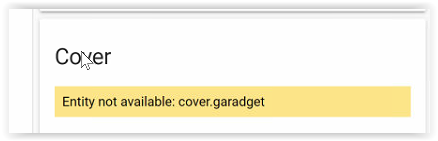
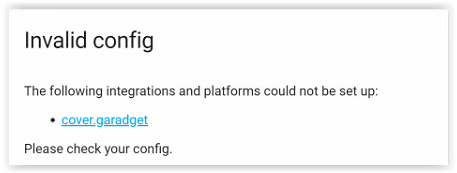
No luck… still says COVER Device not available Cover.garadget Yaml check output does say good config.Yaml file
cover:
- platform: garadget (it shows a dot here but in the yaml it is a dash)
covers:
YOUR\_DEVICE\_ID: (device id is correct)
access\_token: (token is correct )
name: Garage Door
[image containing device account credentials was removed by admin]
---
### Author:  [@madpb](https://community.garadget.com/u/madpb)
#### Post date: [April 12, 2020, 2:14pm UTC](https://community.garadget.com/t/no-longer-communicating-with-home-assistant/7241/17 "2020-04-12T14:14:39Z")
No way is this going to work… the moment I log out of Garadget and log back in the token immediately changes.
---
### Author:  [@GuitarSkater](https://community.garadget.com/u/GuitarSkater)
#### Post date: [April 12, 2020, 2:53pm UTC](https://community.garadget.com/t/no-longer-communicating-with-home-assistant/7241/20 "2020-04-12T14:53:13Z")
No, where I put YOUR\_DEVICE\_ID: put your device ID there, exactly like this;
```
cover:
- platform: garadget
covers:
1234567890:
access_token: 9876543210
name: Garage Door
```
Put your device ID where 1234567890
Put your access token where 9876543210
Again, this is how mine is set-up and it works. I am also not affiliated in any way with Garadget or HASS, just a user like you. Best of luck
---
### Author:  [@madpb](https://community.garadget.com/u/madpb)
#### Post date: [April 12, 2020, 6:30pm UTC](https://community.garadget.com/t/no-longer-communicating-with-home-assistant/7241/22 "2020-04-12T18:30:37Z")
Your giving me hope… I thought at this point no one had theirs working in HomeAssistant so yes, I do appreciate your help…thanks
---
### Author:  [@madpb](https://community.garadget.com/u/madpb)
#### Post date: [April 12, 2020, 6:47pm UTC](https://community.garadget.com/t/no-longer-communicating-with-home-assistant/7241/23 "2020-04-12T18:47:10Z")
YES!! It is working… I even logged out and back in and Home Assistant still works… Oh man,… thank you!!