# Not Laser and M button does seen to work
**URL:** https://community.garadget.com/t/not-laser-and-m-button-does-seen-to-work/8138
**Category:** Hardware
**Created:** [January 30, 2021, 7:58pm UTC](https://community.garadget.com/t/not-laser-and-m-button-does-seen-to-work/8138 "2021-01-30T19:58:30Z")
**Posts on this page:** 10
**Page:** 1
### Author:  [@scbohorquez](https://community.garadget.com/u/scbohorquez)
#### Post date: [January 30, 2021, 7:58pm UTC](https://community.garadget.com/t/not-laser-and-m-button-does-seen-to-work/8138/1 "2021-01-30T19:58:30Z")
We recently move and I was installing the unit at the new house. At first it turn ok, a few minutes later the laser stop. I tried connecting and disconnecting the unit, used a different charger, move it close to the router, pressed the M button to reset the unit, after pressing for 10 sec nothing happened just a cyan light not other colors
---
### Author:  [@garadget](https://community.garadget.com/u/garadget)
#### Post date: [January 30, 2021, 8:23pm UTC](https://community.garadget.com/t/not-laser-and-m-button-does-seen-to-work/8138/2 "2021-01-30T20:23:39Z")
If you get the cyan LED then obviously your unit receives the power and it is connected to the server.
Depending on your unit’s warranty status and your appetite for DIY, here are some options:
- make sure scan period in settings is set to default “once every second”.
- open Garadget and inspect the solder joints around laser leads (cracks, separation of wire etc.) You can gently poke at solder joints to see if that makes the laser come back.
- bypass laser control as shown in the picture below by shorting the the component that drives the laser. If the laser lights up, then the command does not come from the module. If it does not light up then laser or its connection has failed.
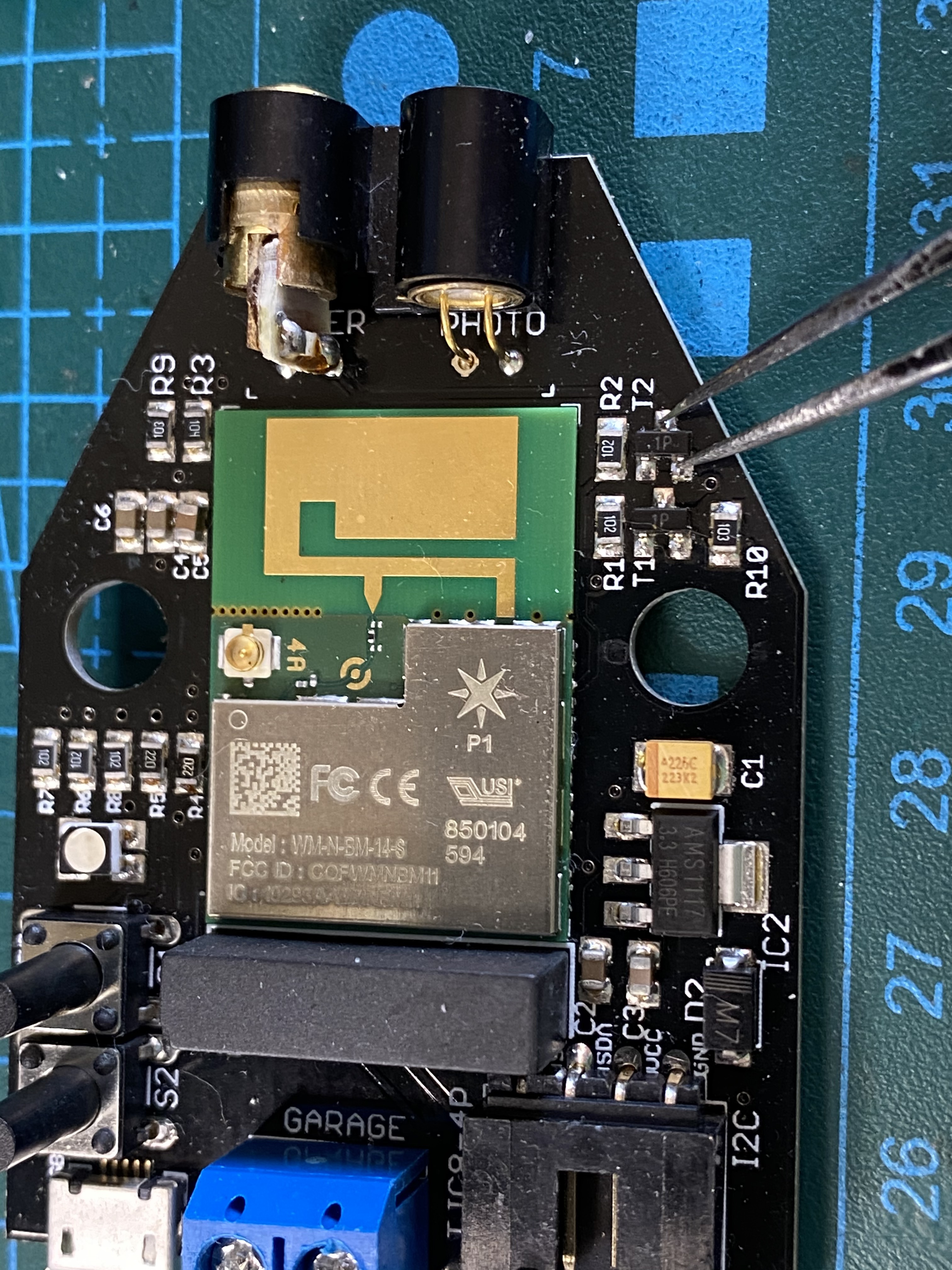
The replacement lasers are cheap and abundant. More information on getting it swapped out is in [this post](https://community.garadget.com/t/low-reflection-low-laser/1240).
---
### Author:  [@scbohorquez](https://community.garadget.com/u/scbohorquez)
#### Post date: [January 31, 2021, 12:57am UTC](https://community.garadget.com/t/not-laser-and-m-button-does-seen-to-work/8138/3 "2021-01-31T00:57:06Z")
Hi Denise, thx for your response. I forgot to mention the cyan light is not a solid one, the unit on the app is offline and I can not reset it to try to install it again. I bypass the laser and it worked
---
### Author:  [@garadget](https://community.garadget.com/u/garadget)
#### Post date: [January 31, 2021, 1:10am UTC](https://community.garadget.com/t/not-laser-and-m-button-does-seen-to-work/8138/4 "2021-01-31T01:10:34Z")
Then it’s not a hardware issue, but server connection issue.
There were several units quarantined due to long inactivity, I cleared them for connection.
Your Garadget might have been one of them. Try powering it up to see if it connects.
---
### Author:  [@scbohorquez](https://community.garadget.com/u/scbohorquez)
#### Post date: [January 31, 2021, 2:33am UTC](https://community.garadget.com/t/not-laser-and-m-button-does-seen-to-work/8138/5 "2021-01-31T02:33:40Z")
Nothing, in the app it said the unit has been offline for 26 hours
---
### Author:  [@garadget](https://community.garadget.com/u/garadget)
#### Post date: [January 31, 2021, 3:27am UTC](https://community.garadget.com/t/not-laser-and-m-button-does-seen-to-work/8138/6 "2021-01-31T03:27:08Z")
There could be something with the router that blocks Garadget from reaching its server.
Check the blocking, parental controls and things like that.
For troubleshooting you can configure one phone as a mobile hot spot and use another WiFi enabled device to configure Garadget to connect to that mobile hot spot. If Garadget gets online this way then the issue is with your router’s configuration.
---
### Author:  [@scbohorquez](https://community.garadget.com/u/scbohorquez)
#### Post date: [January 31, 2021, 1:09pm UTC](https://community.garadget.com/t/not-laser-and-m-button-does-seen-to-work/8138/7 "2021-01-31T13:09:17Z")
How am I going to setup a new wireless connection if the unit doesn’t allow me to reset the network. Every time I press the M key for 10 secs o more the unit still stuck in the cyan blinking light
---
### Author:  [@garadget](https://community.garadget.com/u/garadget)
#### Post date: [January 31, 2021, 7:22pm UTC](https://community.garadget.com/t/not-laser-and-m-button-does-seen-to-work/8138/8 "2021-01-31T19:22:33Z")
Another thing to try is go [re-flash the firmware](https://community.garadget.com/t/garadget-firmware-1-24/8078).
If that doesn’t work or seems too technical, pleas PM me for the service arrangements.
---
### Author:  [@scbohorquez](https://community.garadget.com/u/scbohorquez)
#### Post date: [January 31, 2021, 7:46pm UTC](https://community.garadget.com/t/not-laser-and-m-button-does-seen-to-work/8138/9 "2021-01-31T19:46:55Z")
How I re-flash the firmware?
---
### Author:  [@garadget](https://community.garadget.com/u/garadget)
#### Post date: [January 31, 2021, 7:48pm UTC](https://community.garadget.com/t/not-laser-and-m-button-does-seen-to-work/8138/10 "2021-01-31T19:48:52Z")
I fixed the link: [Garadget firmware 1.24](https://community.garadget.com/t/garadget-firmware-1-24/8078)